Showing posts with label Facebook Tricks. Show all posts

Jan 10, 2012

Official Facebook Messanger is Available Now For Windows

Recently Facebook launched its testing version of Facebook Messenger for windows. Its a small app with the size of less than 500kb. But has some great features. 

Features:
  • Chat and message with your friends on Facebook
  • See the latest updates from your friends in ticker
  • Get quick notifications about what’s going on


NOTE: This Facebook messenger is Not Supported for Windows XP, It works only on Windows 7. If you  are using XP then Use THIS Software.
 

Dec 29, 2011

Send Free SMS Using Facebook To Anywhere In the World


Why to use other websites when you can send SMS directly through Facebook: The world's Best Social networking website. See The below Steps to Send Free sms.


How to Send Free SMS via Facebook:
  1. Login to your Facebook Account and go to http://apps.facebook.com/chatsms/
  2. When the Request and Permission window opens then click on Allow button.
  3. Select the country where you want to send the SMS.
  4. In the Phone Number field give your Friends mobile number and in the SMS text field type your message.
  5. After this click on Send SMS button and your SMS will be delivered within few seconds.
    The sent message will contain the First name of your Facebook with your message. 

Nov 23, 2011

fTalk : Facebook Chat Client for Windows

We all know opening the facebook takes a little bit time and consumes a lot bandwidth as it loads many unwanted thinks like feeds, Advertisements and more. Most of people uses facebook for chatting, so the Ftalk will help those people to chat directly by opening Ftalk software.
Features Included in fTalk
  • Faster and more accessible than Facebook chat
  • No need to open Facebook
  • Get notified when friends come online
  • Update your status right from the app
  • Free and easy to use
  • Cool emoticons
Download it form below link and install it on your windows PC. Insert your login details and start chatting with your friends.

Download 


Sep 25, 2011

Trick to Hide Facebook Friend list From Others

Today i am going to show how to Hide Facebook Friend list From Others. Facebook has changed their interface in this September 2011 and it has become quite difficult for some users to get friendly with this new interface.

1. Log into your Facebook Account.

1. Go to: http://www.facebook.com/editprofile.php?sk=relationships

2. Go to the "Friends" label on that page.

3. Click the privacy selector drop down menu and select “Only Me” (See image)

4. Select "Save Changes". Now your friends list will only be visible to you.

Sep 18, 2011

Get More Facebook Likes,Twitter Followers,Google+ followers And More


Tweers is a website which provides registered users to get more Facebook page likes, more twitter followers, get more traffic to your website.


Apart from growing your twitter followers, youtube views, facebook likes you also have the feature of re-tweeting, Facebook shares,LinkedIn,digg votes, google + voting and stumble upon voting.


Aug 26, 2011

Protect Your Facebook Photos and Information

Many blogs posting facebook going to sell your personal facebook information and your photos Third Parties and Ad-networks , So before sell your information, change some facebook account settings protect your facebook details sharing from Third Parties.

Login in your facebook account then go to Accounts->Account Settings-> and Click Facebook Ads tab then click “Edit third party ad settings” under “Ads shown by third parties” , then next “If we allow this in the future, show my information to” choose as “No one” then save Changes
 
Now your Facebook Account Photos and your Information Protected

Aug 23, 2011

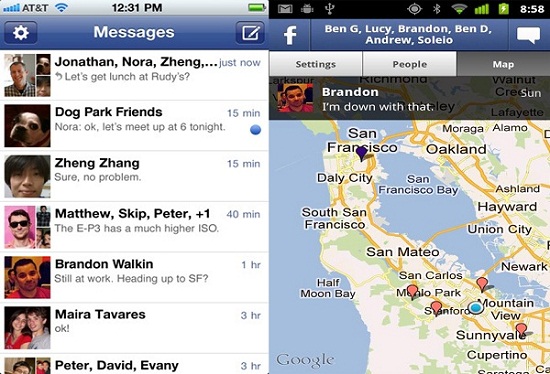
Official Facebook Messanger App For Android and iPhone

If you use Facebook on your mobile device, you might be a frequent user of its messaging service. If so, you might become the newest fan of Facebook’s just-released standalone messaging app for both Android and iPhone.

This new application includes Facebook Chat (Individual & Group), and also location sharing.


DOWNLOAD

Aug 22, 2011

All Facebook Keyboard Shortcuts

Most Of People spend a lot of time on facebook then why not spend it more efficiently.There are a lot of browser specific keyboard shortcuts for facebook.You can create new messages,view account settings,View notifications etc .Once you get familiar with these shortcuts you can easily navigate on facebook.

Firefox Facebook Shortcuts

    * Shift+Alt+1: View your News Feed
    * Shift+Alt+2: View your own Profile
    * Shift+Alt+3: View pop-up of friend requests
    * Shift+Alt+4: View pop-up of messages
    * Shift+Alt+5: View pop-up of notifications
    * Shift+Alt+6: View Account Settings
    * Shift+Alt+7: View Privacy Settings
    * Shift+Alt+8: View Facebook’s own profile
    * Shift+Alt+9: Read latest Terms of Service agreement.
    * Shift+Alt+0: Open Facebook Help Center
    * Shift+Alt+?: Search
    * Shift+Alt+m: Compose a new message

Google Chrome Facebook Shortcuts
    * Alt+1: View your News Feed
    * Alt+2: View your own Profile
    * Alt+3: View pop-up of friend requests
    * Alt+4: View pop-up of messages
    * Alt+5: View pop-up of notifications
    * Alt+6: View Account Settings
    * Alt+7: View Privacy Settings
    * Alt+8: View Facebook’s own profile
    * Alt+9: Read latest Terms of Service agreement.
    * Alt+?: Search
    * Alt+m: Compose a new message

If you are using Internet Explorer then you you can use the Facebook shortcuts of Google chrome,but you have to press ENTER after each shortcut .